Trail navigation
Import a GPX course on your phone and send it to the watch. You get a north up overview of the course, the distance left and how far off course you are. No map tiles to download.

For Garmin Instinct 2X and iPhone · Private beta
Ridgify notices when you are hiking, flying or riding home, and saves each part on its own. Your wrist shows the route, your lift and the wind. Your phone keeps working from your pocket.
Ridgify is in private beta on TestFlight. The Garmin Instinct 2X is the first supported watch.


How a day looks
Hike up, launch, land, ride back. Ridgify spots each change and starts a new activity, so trail time and air time never blur into one file. Walking and running both count as Trail.
An example outing. The ride home is never a sport activity, but it stays in the full track, so you can still export the whole day as one GPX file.
What it does
Import a GPX course on your phone and send it to the watch. You get a north up overview of the course, the distance left and how far off course you are. No map tiles to download.
GPS altitude, ground speed, lift and air time on one page. Use the watch's own estimate, or connect a BlueFly or SoarMate vario over Bluetooth.
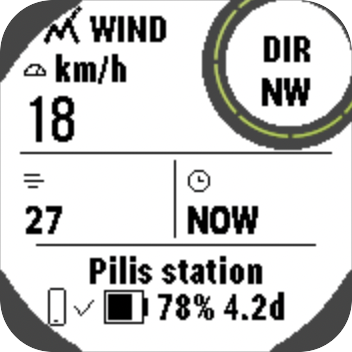
The nearest weather station on your phone and your wrist, with the age of every reading. Speed always, gust and direction when the station reports them. MetNet stations in Hungary, your saved Windy stations elsewhere.
The phone app is built to keep working with the screen off. The watch shows at a glance whether the phone link is alive, plus battery and the time left on it.
Share the full outing as one GPX file, including the ride home. Each trail and flight also stays on the watch as its own activity.
Share your position live on PureTrack and look at nearby paraglider traffic. It stays off until you start it, and you can stop it at any time.
On your wrist
Big numbers, plain icons, one job per page. The round window shows the one value that matters on that page.
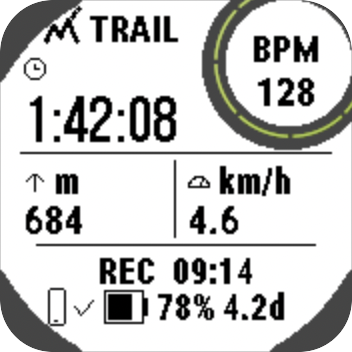
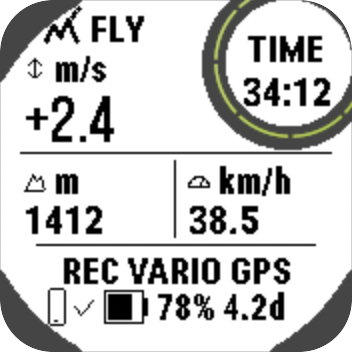
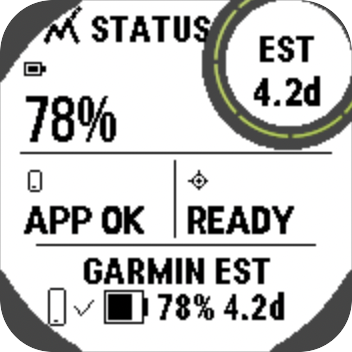
Screens from the Connect IQ simulator with example values. Light and dark themes are both included.
On your iPhone
Every outing saves on your phone, point by point, with the trail, flight and ride home marked on one line.

Straight about limits
Ridgify does not replace a flight computer, official charts or your own judgement. Wind readings come from stations that can differ from your launch.
Wind says how old it is. Stale or missing data is labelled on the screen, so an old number never passes for a live one.
The watch page is built, but the airspace service it needs is not running yet, so the page says to wait. Airspace data will be advisory, and vertical limits will stay unverified.
Recording starts and saves on the watch without the phone. If the phone link drops, you lose wind updates, not your track.
Questions
The Garmin Instinct 2X is the first supported watch. An Instinct 2 build exists but has not been tested yet.
No. The watch records and saves on its own. The phone adds GPX import, live wind, the journal and optional live sharing.
Ridgify is in private beta on TestFlight. Write to hello@ridgify.com with your iPhone and watch model to ask for an invite.
Your tracks stay on your watch and iPhone. Ridgify has no accounts, ads or analytics and runs no server that receives your tracks. A few optional features contact other services, and the privacy policy lists each one.
No. It is an aid. Wind readings and airspace data are advisory.
No. Ridgify is independent. It runs on Garmin watches through the Connect IQ platform.
Send your iPhone and watch model and you will get a TestFlight invite when a place opens.
Email hello@ridgify.com